Ariadne Voice on a Mac: a spoken request becomes a finished task, and the answer comes back aloud, with no window in the way.

You Hey Ariadne, put a team meeting in for tomorrow at 2.

For Mac

Tell your Mac what to do

Ariadne reads your mail, checks your calendar, turns off the lights and tells you who is at the door. You talk to it like a person: no commands to memorise, no hunting around the screen.

Requires a Mac with Apple silicon (M1 or later) and macOS 26 or later. Install and update without looking at the screen.

A computer can be a maze designed by sighted people

Information carried by colour. A button with no name. A window that pops up and takes away the place you were reading.

A screen reader will read you a button's name and tell you where the cursor is. Reaching it is still on you.

Ariadne clicks it for you.

Say it in a sentence, not a command

“Find the contract from Kowalski and reply that I agree.” That is it. The rest is its job: open the mail, find it, write, send.

If a task takes more than a moment, Ariadne says so. Esc stops it at any time, with no button to hunt for.

Not everything happens on screen

The home, the cameras, the calendar, the mail, and whether your people got there.

“Is there a car outside?” has no answer on the screen. Ariadne takes a snapshot from the camera and tells you what is on it.

Independence
Accessibility
Privacy
Simplicity
Features

What Ariadne Voice can do

Eight things it does from a spoken sentence.

Running your Mac

Turns a map of the screen into a sentence. Apps, files, messages, commands.

Mail and calendar

“What's on today?” An answer in seconds, with no app to open.

Home control

“Lights off in the living room” turns off all of them, not one lamp.

Camera snapshots

“Is there a car outside?” Ariadne looks, and tells you what it sees.

There's more

Home control and cameras are only the start. See the full list of what Ariadne Voice can do.

All features (8) →
How it works

Three steps

Install without looking at the screen. After that, you just talk.

Download and install

One file, plain-text instructions, read end to end by VoiceOver.

Call it, or press the shortcut

“Hey Ariadne” or a keyboard shortcut, from any app.

Say what should happen

In a plain sentence, not a command. Esc stops it at any moment.

How it works

Why a Mac

Nothing else to buy

VoiceOver, the microphone and the whole system are already on your desk. Ariadne adds one thing: it understands what you are asking for, and does it. No new device, no second program to learn.

See how it works

The settings window

Settings you can work through by ear

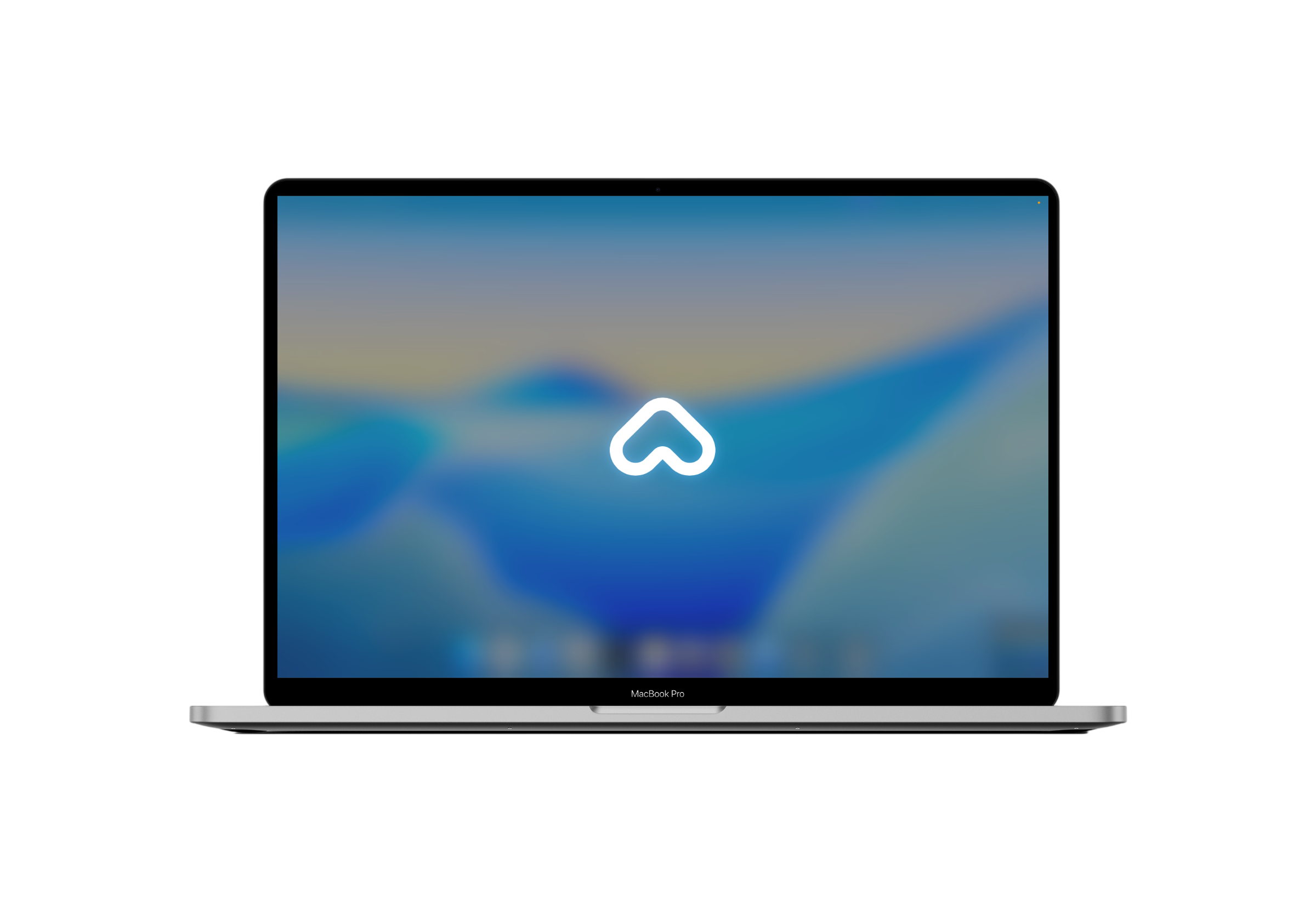
Ariadne lives in the menu bar and usually has no window. This is the only one it has, built from native macOS controls, so a screen reader knows their role and value without our help.

The Ariadne Settings window. On the left a list of sections: Startup, Intelligence, Speech, Plugins, Permissions, Developer, About. On the right the Startup section is open, with toggles for “Launch at login” and “Respond to hey Ariadne”, and the shortcut set to Command Control Option Space. Under each group is a sentence explaining what the option does.
Every setting has a sentence underneath about what it really changes, including what it costs.
Privacy

You know where your data goes

Because you have no way to check for yourself, so we say it plainly.

  • The wake word stays on your MacUntil you call, no audio leaves the machine. The wake word is heard by macOS speech recognition.
  • Your keys stay yoursYour AI provider keys live in the macOS keychain. We never send them anywhere except the provider they belong to.
  • We run no server of our ownWe collect nothing about you. The activity log lives only on your disk and you can delete it whenever you like.
  • We name the costs tooOnce you call, the conversation goes to your AI provider, and with each task goes what it is about: message text, camera images. We say so in the app, under About.
  • We use Anthropic and OpenAI models, and we say so plainly in the privacy policy, including that what a task is about goes out with the task.
Download

Start talking to your Mac

One file: a disk image. Open it, move Ariadne to your Applications folder and launch it from there. Inside you'll find plain-text instructions, read by VoiceOver from the first sentence to the last.

Requires a Mac with Apple silicon (M1 or later) and macOS 26 or later. The app updates itself quietly and holds the install until your conversation ends, so nothing interrupts you mid-sentence.

Contact

Get in touch

We answer every message. Reports about safety and accessibility come first.

We'll reply to this address.
Briefly describe how we can help.

hello@ariadnesense.com